This module provides a collection of pre-designed templates, or "view modes," for displaying content in various layouts such as cards and teasers. It helps you quickly configure how different types of content appear on your website.
Provides a set of templates for content "View Modes" that are typically used (some of them) in each website.
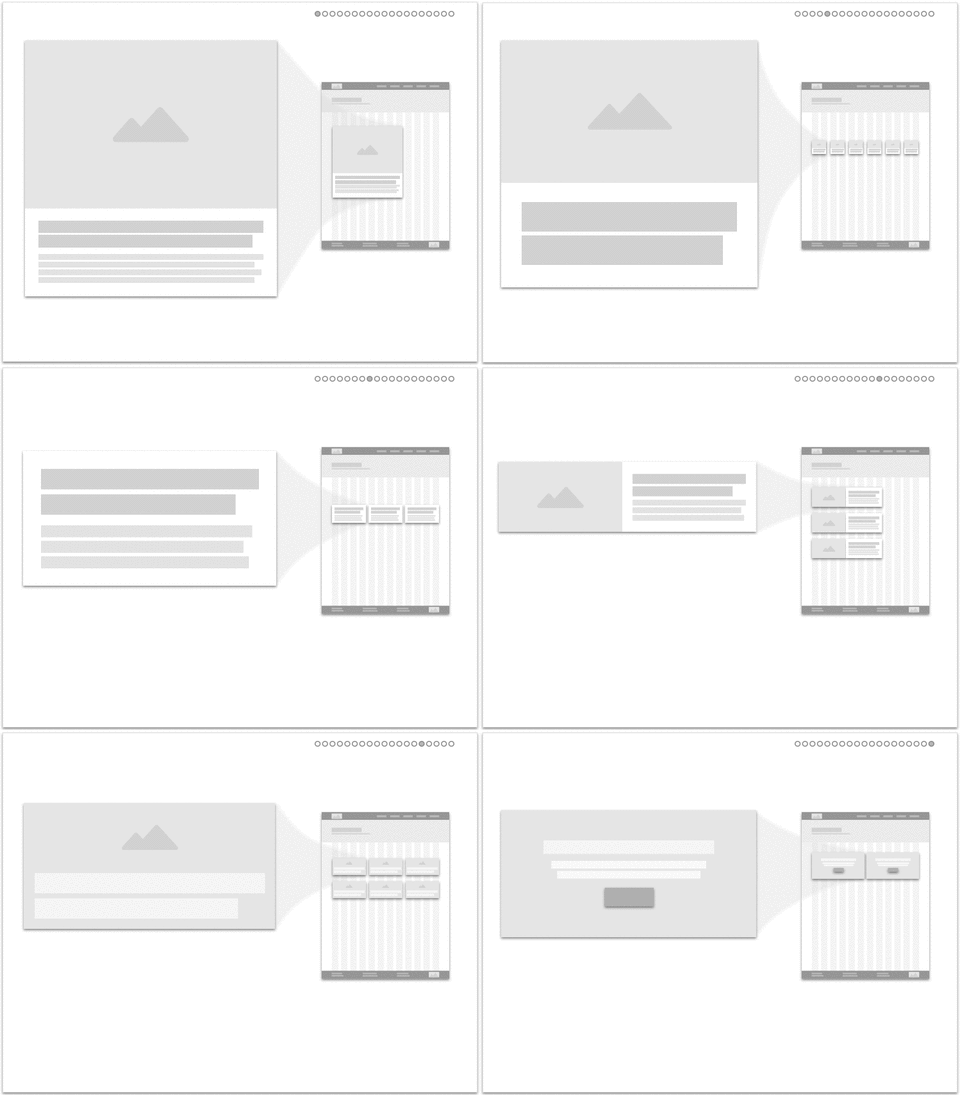
In VMI ~3.0.0 and ~4.0.0
Available View Modes and Layouts:
Impressed cards:
- Impressed card - xlarge.
- Impressed card - large.
- Impressed card - medium.
- Impressed card - small.
- Impressed card - xsmall.
Featured cards:
- Featured card - xlarge.
- Featured card - large.
- Featured card - medium.
- Featured card - small.
- Featured card - xsmall.
Text cards:
- Text card - large.
- Text card - medium.
- Text card - small.
Overlay cards:
- Overlay card - xlarge.
- Overlay card - large.
- Overlay card - medium.
Hero cards:
- Hero card.
In VMI ~2.0.0
Available View Modes and Layouts:
Vertical media
- Vertical media teaser - xlarge.
- Vertical media teaser - large.
- Vertical media teaser - medium.
- Vertical media teaser - small.
- Vertical media teaser - xsmall.
Horizontal media
- Horizontal media teaser - xlarge.
- Horizontal media teaser - large.
- Horizontal media teaser - medium.
- Horizontal media teaser - small.
- Horizontal media teaser - xsmall.
Text teaser
- Text teaser - large.
- Text teaser - medium.
- Text teaser - small.
Touts
- Tout - xlarge.
- Tout - large.
- Tout - medium.
Hero
- Hero xlarge.
Requirements
- A Bootstrap 4/5 theme or sub theme.
- Display Suite module.
- Display Suite Extras module.
- Field Group module.
- Smart Trim module.
Example Site Building steps
Making use of this module, by following the listed steps:
- Given that the "View Modes Inventory (VMI)" module was enabled
- And a "Content type" was created to utilize the view modes available from VMI
- And the "Content type" has a "Title field"
- And a "Body field"
- And an "Image field named (field_image) " or "Video field named (field_video) or "Media field named (field_media)""
- When the "Manage display" under the Default view mode been visited
through theadmin/structure/types/manage/[CONTENT_TYPE_NAME]/displaylink - On the "Custom display settings" tab link
- The list of ready View Modes Inventory (VMI) will be listed
- On selecting a View Mode for a Content type then saving
- The list of enabled View Modes with auto mapped fields with their layout and settings will be ready configured out of the box.
Watch this YouTube video for a quick tips
Sponsored and developed by Vardot.
Drupal 11
· not 10
Ask your assistant about View Modes Inventory - Bootstrap Ready
Check compatibility with your Drupal and PHP version, maintenance and security coverage, from current release data. How it works
Depends on
Dependencies of the latest stable release
- node Drupal core
- user Drupal core
Required by
2 tracked projects depend on this one
- Varbase Blog (Corporate Blog) 152 sites
- Varbase Demo 40 sites
Activity
Release Timeline
Releases
| Version | Type | Core | PHP | Release date | |
|---|---|---|---|---|---|
| 5.0.1 | Stable | 11 | Sep 24, 2026 | ||
| 5.0.0 | Stable | 11 | Sep 5, 2026 | ||
| 5.0.0-beta1 | Pre-release | 11 | Jul 9, 2026 | ||
| 5.0.0-alpha2 | Pre-release | 11 | Jul 7, 2026 | ||
| 4.0.1 | Stable | 11 | Jul 7, 2026 | ||
| 3.0.6 | Stable | 10–11 | Jul 7, 2026 | ||
| 8.x-2.23 | Stable | 10–11 | Jul 7, 2026 | ||
| 5.0.0-alpha1 | Pre-release | Apr 28, 2026 | |||
| 5.0.x-dev | Dev | 11 | Feb 11, 2026 | ||
| 4.0.0 | Stable | Feb 11, 2026 |