This module provides a user interface for managing server configurations within Drupal. It allows administrators to easily configure and monitor server-related settings directly from the Drupal admin area.
A lot of the code in this module has been created using an AI assistant using Strikethroo & Kenkeep for improved Drupal code generation.
Overview
The admin interface for MCP Server. The runtime ships deliberately UI-free: it exposes config objects, plugin managers, and a mcp_prompt_config entity type with no forms attached. mcp_server_ui is what turns all of that into four tabs under Configuration → Web services → MCP Server, so a site builder can name the server, enable resource plugins, and author MCP prompts without touching YAML or a text editor.
Requires MCP Server 2.x. Nothing here is required at runtime. The MCP endpoint works with config written by hand or deployed from config/sync. Install this module when a human needs to see and change that config.
Key capabilities
Server settings
Name, version, pagination limit, and the sampling / elicitation timeouts that govern pending requests, all writing to mcp_server.settings.
Plugin enablement
Every resource provider and resource template provider on the site, listed with an enable checkbox and its own delegated configuration subform.
Prompt authoring
Full CRUD for mcp_prompt_config entities: arguments, completion providers, and multi-part message content, no PHP and no YAML.
Four tabs, one admin section

Settings is the identity and pacing of the server: what MCP clients see in initialize, how many items a list page returns, and how long the server waits on a client for sampling or elicitation.
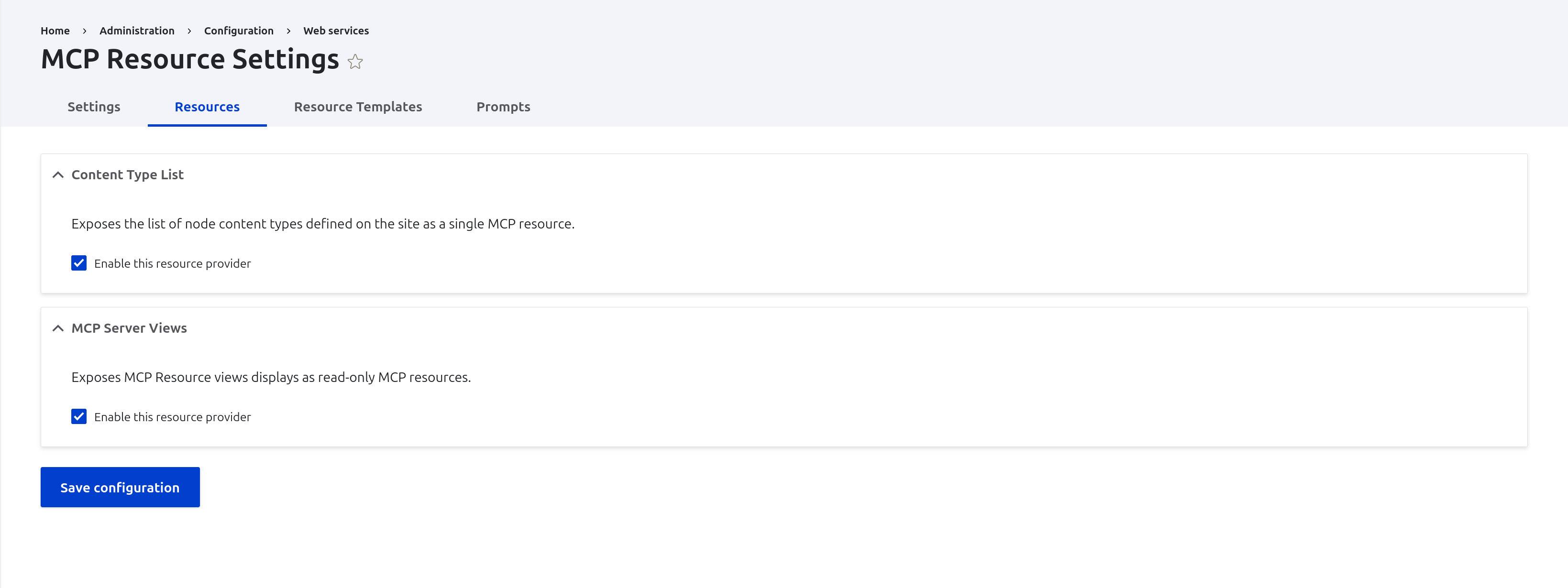
Resources and Resource Templates enumerate every plugin discovered on the site, whether from MCP Server, from Examples, from Views, or from your own module, and let you turn each one on with its own settings.


Prompts lists every mcp_prompt_config entity with its title, description, and enabled state, the same set an MCP client gets back from prompts/list.
The prompt form builds arguments and messages incrementally over AJAX. Nothing is written to config until you press Save.
How it works
- Install alongside MCP Server:
composer require drupal/mcp_server_uianddrush en mcp_server_ui -y. - The module declares a route at
/admin/config/services/mcp-server/settingsand a menu link under Configuration → Web services. Resources, Resource Templates, and Prompts hang off that route as local tasks. hook_entity_type_alter()attaches a list builder, add / edit form classes, and the four link templates to MCP Server'smcp_prompt_configentity type. Uninstall this module and the entity type keeps working; it simply stops having a UI.- Every form is a
ConfigFormBaseor anEntityForm. Saving writes ordinary config, so the result is exportable, deployable, and diffable like anything else inconfig/sync.
Because the tabs are keyed on the mcp_server_ui.settings base route, companion modules extend the same admin section instead of building their own. MCP Server Tool Bridge adds its Tools tab this way.
Settings
The Settings tab edits mcp_server.settings directly:
- Server name and Server version: the identity returned in the MCP
initializehandshake. Both required. - Pagination limit: how many entries a
*/listresponse returns per page. Bounded to 1–1000. - Pending request settings: the server-to-client direction of the protocol, with
poll_interval_ms(minimum 50ms),sampling_timeout, andelicitation_timeout, both in seconds. These control how long a tool that asks the model for a completion, or asks the user for input, waits before giving up.
Resources and Resource Templates
Both tabs are the same form with a different plugin manager behind it. Each discovered plugin renders as a collapsible group, open when enabled:
- The plugin's own description from its attribute, so the list is self-documenting.
- An enable checkbox, and below it the plugin's own
buildConfigurationForm()output, revealed with#stateswhen the checkbox is ticked. Validation and submission are delegated back to the plugin through aSubformState, so a plugin's settings stay the plugin's business. - Missing module dependencies disable the checkbox and print a warning naming the modules to install, rather than letting you enable something that cannot run.
Resources save to mcp_server.resource_providers and invalidate mcp_server:resource_providers; resource templates save to mcp_server.resource_template_providers and invalidate mcp_server:discovery. Clients see the change on their next resources/list.
Prompt configurations without code
The prompt form is the largest piece of this module and the reason most sites install it. A prompt is a config entity, and the form covers the whole shape of it.
Identity
- Prompt Name: the name exposed to MCP clients, with a machine name checked for uniqueness as you type.
- Title and Description: optional; both surface in
prompts/list. - Enabled: unchecked prompts stay in config but disappear from the protocol.
Arguments
Add argument appends an argument group over AJAX. Each argument carries a label, a machine name (unique within the prompt), a description, and a required flag. Then comes the part that is genuinely hard to hand-write:
- Completion providers are chosen from checkboxes listing every
#[ArgumentCompletionProvider]plugin on the site. - Ticking one loads that plugin's configuration form inline, over AJAX, in its own details group. An entity query provider asks for entity type, bundle, and result format; a static list provider asks for the list.
- Several providers can be attached to a single argument and their suggestions are chained, so a hand-curated list and a live entity query can back the same field.
Messages
Add message appends a message with a Role of user or assistant and exactly one typed content block. Changing the content type rebuilds the fields under it:
- Text: a textarea.
- Image and Audio: either upload a file, which the form converts to base64 and stores with the detected MIME type, or enter the MIME type and base64 payload manually. The upload path is the only practical way to get a binary content block into a prompt without shelling out to
base64. - Resource: a URI, MIME type, and text body, for embedding a resource reference into the prompt.
Validation runs per content type before anything is saved: text needs text, media needs both a MIME type and data, resources need a URI.
Prompts authored here are ordinary mcp_server.mcp_prompt_config.* config. Build one in the UI, export it, and ship it in a module's config/install/, which is exactly how the eight prompts in MCP Server Examples were produced.
Permissions
administer mcp server: the Settings, Resources, and Resource Templates tabs.administer mcp prompt configurations: create, edit, and delete prompt configurations.
Both permissions are marked restrict access. Anyone holding them can change what your site exposes to AI clients: which resources are readable and what prompts instruct a model to do. Grant them like you would grant administer site configuration, not like an editorial permission.
Related projects
- MCP Server: the runtime, plugin contracts, and config this module edits.
- MCP Server Examples: reference plugins and prompt configurations to look at through these forms.
- MCP Server Tool Bridge: exposes Tool API tools as MCP tools; adds the Tools tab.
- MCP Server OAuth: OAuth 2.1 authentication for the MCP endpoint.
- MCP Server Views: exposes Views displays as MCP resources; its provider appears on the Resources tab.
Resources
- Model Context Protocol Documentation
- MCP Prompts Specification
- MCP Resources Specification
- MCP Sampling Specification
- MCP Elicitation Specification
Credits
Maintained by the MCP Server contributors.
Depends on
Dependencies of the latest stable release
No dependencies recorded for this project.
Required by
Tracked projects that depend on this one
No tracked projects depend on this one yet.
More in the MCP ecosystem
Most installed first
Activity
Release Timeline
Releases
| Version | Type | Core | Release date | |
|---|---|---|---|---|
| 1.0.0-beta2 | Pre-release | 10–11 | Oct 2, 2026 | |
| 1.0.0-beta1 | Pre-release | 10–11 | Jul 29, 2026 | |
| 1.x-dev | Dev | 10–11 | Jul 2, 2026 |