This module integrates with the SerpApi service to perform Google searches from your Drupal site, allowing you to retrieve search results for any query, location, or language. It also provides an AI Automator type to automatically generate a list of links based on a given search term.
SerpApi is a service that can take a serch word and search in any region in any language in Google and give back the links as results.
SerpApi is a module that currently have two things available for it. The one thing is a service where you can link from the SerpApi service for any third party module that would want to use it for SEO or research reasons.
The other core feature is that it has one AI Automator type for the AI Automator module that can be found in the AI module. It makes it possible to take a search word and generate a list of links for the first results for that search word. This together with a scraper module makes it immensly powerful. Like below:
Using AI Automator with SerpApi to get real links from a search word
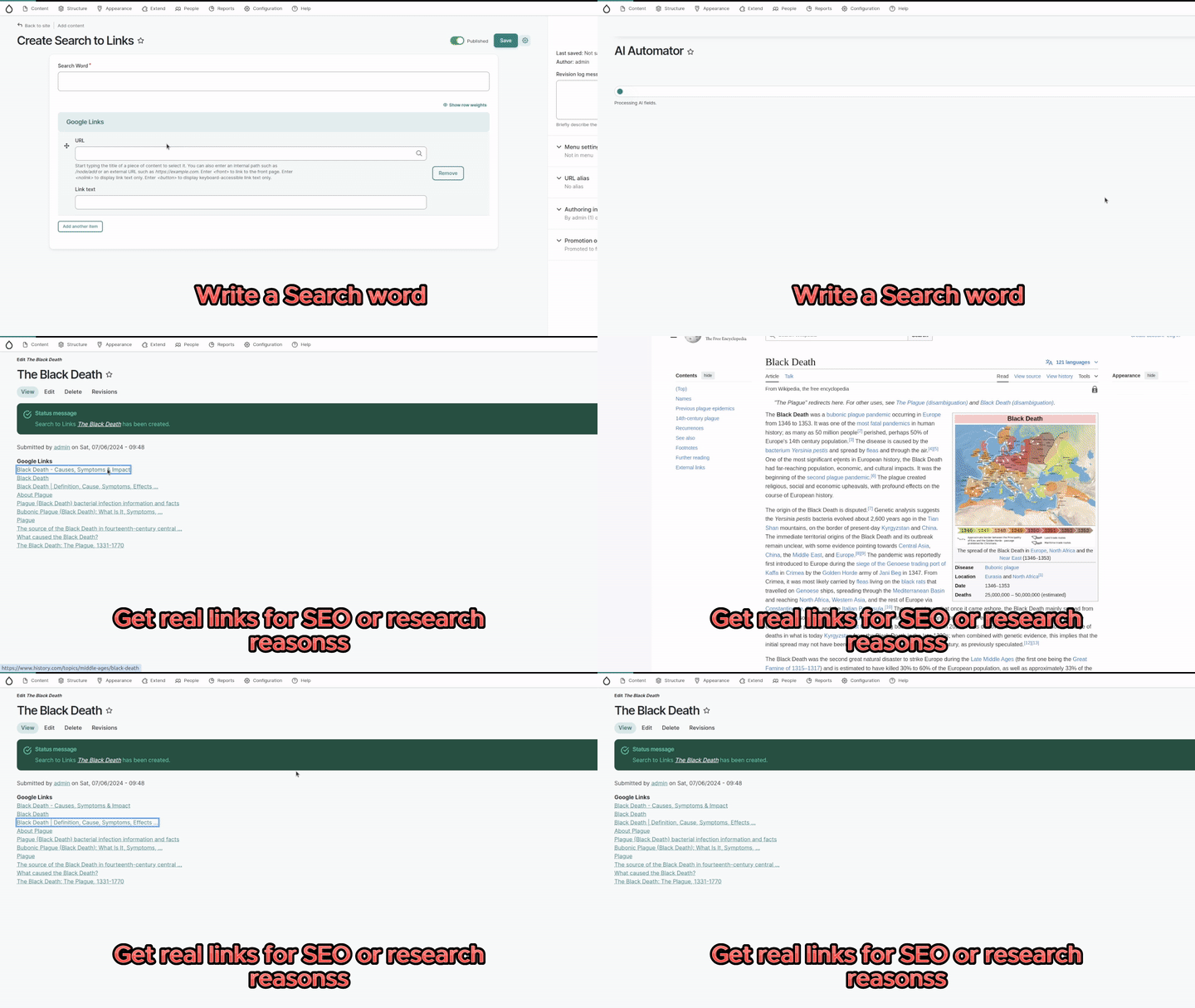
Note that this is the follow up module of the AI Interpolator Serp and makes that module obsolete for Drupal 10.3+.
Features
- Search using Google search or Google news search.
- Search from any location.
- Search on any regional Google like google.de or google.jp.
- Search for results in any language.
Requirements
- Requires an account at SearchApi. There is a free trial.
- To use it, you need to use a third party module using the service. Currently its only usable with the AI Automator submodule of the AI module
How to setup with AI Automator
- Install the AI module.
- Install this module.
- Visit /admin/config/serpapi/settingsand add your api key from your SerpApi account.
- Create some entity or node type with a string field.
- Create either a Link field with multiple results.
- Enable AI Automator checkbox and configure it.
- Create an entity of the type you generated, fill in some search word and save.
- The links will be filled out.
Use the service
This is a code example on how you can get links for the search word Why should I use Drupal?".
See https://serpapi.com/search-api for most of the configs available.
$serpapi = \Drupal::service('serpapi.api');
// Configure how you want it to run.
$parameters = [
  'engine' => google,
  'q' => 'Why should I use Drupal?'
];
// Get answers in a json array.
$response = $serpapi->searchCall($parameters);Ask your assistant about SERP API
Check compatibility with your Drupal and PHP version, maintenance and security coverage, from current release data. How it works
Depends on
Dependencies of the latest stable release
No dependencies recorded for this project.
Required by
Tracked projects that depend on this one
No tracked projects depend on this one yet.
Activity
Releases
| Version | Type | Core | PHP | Release date | |
|---|---|---|---|---|---|
| 1.0.x-dev | Dev | 10–11 | Jul 6, 2024 |