Part of the Recaptcha ecosystem · 5 projects
This module integrates Google reCAPTCHA v3 into your Drupal site to enhance security without interrupting the user experience. It allows you to define specific actions, set score thresholds, and configure fallback challenges like reCAPTCHA v2 for failed verifications.
Google reCAPTCHA v3 Module provides a streamlined and secure solution for integrating Google reCAPTCHA v3 and fallback challenges into your Drupal site. This module enhances security without adding user friction, ensuring a smooth user experience. It allows administrators to configure actions based on scores returned by reCAPTCHA v3 and set up fallback challenges like reCAPTCHA v2 if the initial verification fails. This approach maximizes security while maintaining a user-friendly interface.
Screenshots:
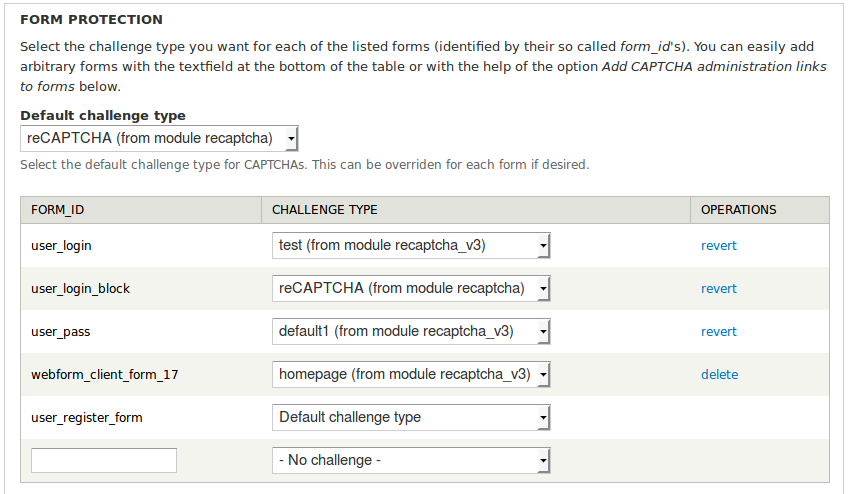
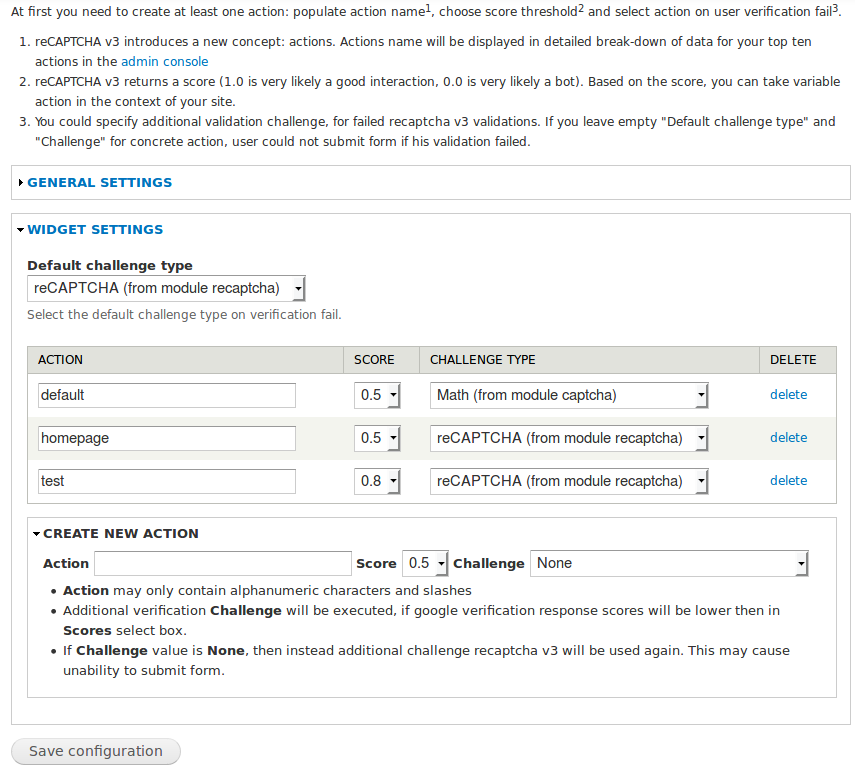
Main features/ functionalities:
- Seamless User Authentication:
Google reCAPTCHA v3 provides seamless user authentication without requiring user interaction like clicking checkboxes or solving image puzzles. - Action-Based Scoring:
It introduces the concept of actions, allowing you to define specific actions on your website and set score thresholds for them. - Flexible Security Measures:
You can customise the actions, set score thresholds, and define actions to take when user verification fails. This flexibility allows you to tailor your security measures based on your website's specific needs. - Fallback Challenge:
In cases where user verification using reCAPTCHA v3 fails, you have the option to provide an additional challenge (fallback) to ensure maximum security without causing user friction. This additional challenge can be a reCAPTCHA v2 or another method of verification.
Usage example:
Register reCAPTCHA v3 keys here and follow these steps to enable and customise reCAPTCHA v3 on your webpage:
- Create at least one action: Populate the action name.
reCAPTCHA v3 introduces a new concept: actions. The action name will be displayed in a detailed breakdown of data for your top ten actions in the admin console.
- Choose a score threshold: reCAPTCHA v3 returns a score (1.0 is very likely a good interaction, 0.0 is very likely a bot). Based on the score, you can take various actions in the context of your site.
- Select action on user verification fail: Specify the additional validation challenge for failed reCAPTCHA v3 validations.
If you leave the "Default challenge type" option and "Challenge" for a concrete action empty, then if user validation fails, reCAPTCHA v3 will be used again. This can lead to the inability to submit forms for suspicious users.
Requirements/ dependencies:
- captcha: The module for Drupal 7 requires the dev version of the recaptcha module! With stable 7.x-2.2 recaptcha version you will get WSOD on form submission! We recommend using this module together with recaptcha: set default captcha type to recaptcha v3 and select recaptcha v2 for the additional challenge. For drupal 8.x please read the documentation.
Installation
For detailed installation and configuration instructions, visit: Google reCAPTCHA v3 Module Installation.
Useful resources
Register reCAPTCHA v3 keys here: Google reCAPTCHA v3 Admin.
Related modules/ compatible modules
Ask your assistant about reCAPTCHA v3
Check compatibility with your Drupal and PHP version, maintenance and security coverage, from current release data. How it works
Depends on
Dependencies of the latest stable release
Required by
Tracked projects that depend on this one
No tracked projects depend on this one yet.
More in the Recaptcha ecosystem
Most installed first
Activity
Release Timeline
Releases
| Version | Type | Core | PHP | Release date | |
|---|---|---|---|---|---|
| 2.0.5 | Stable | 10–11 | Apr 24, 2026 | ||
| 2.0.4 | Stable | 10–11 | Feb 13, 2025 | ||
| 2.0.3 | Stable | 10–11 | Aug 12, 2024 | ||
| 2.0.2 | Stable | 9–10 | Aug 21, 2023 | ||
| 2.0.1 | Stable | 9–10 | Aug 18, 2023 | ||
| 2.0.0 | Stable | 9–10 | Aug 18, 2023 | ||
| 8.x-1.9 | Stable | 9–10 | Aug 18, 2023 | ||
| 2.0.0-alpha1 | Pre-release | 9–10 | Apr 15, 2023 | ||
| 2.0.x-dev | Dev | 10–11 | Apr 1, 2023 | ||
| 8.x-1.8 | Stable | 9–10 | Apr 1, 2023 |