This module provides a field formatter for displaying media reference fields as interactive image galleries using the lightGallery JavaScript library. It supports mixed content like images and videos, offers reusable gallery profiles for easy configuration, and includes touch gestures, zoom, fullscreen, and thumbnail options without requiring external libraries.
Synopsis
A field formatter for displaying media reference fields using the lightGallery JavaScript library — create beautiful, interactive image
galleries with minimal configuration.
Screenshots
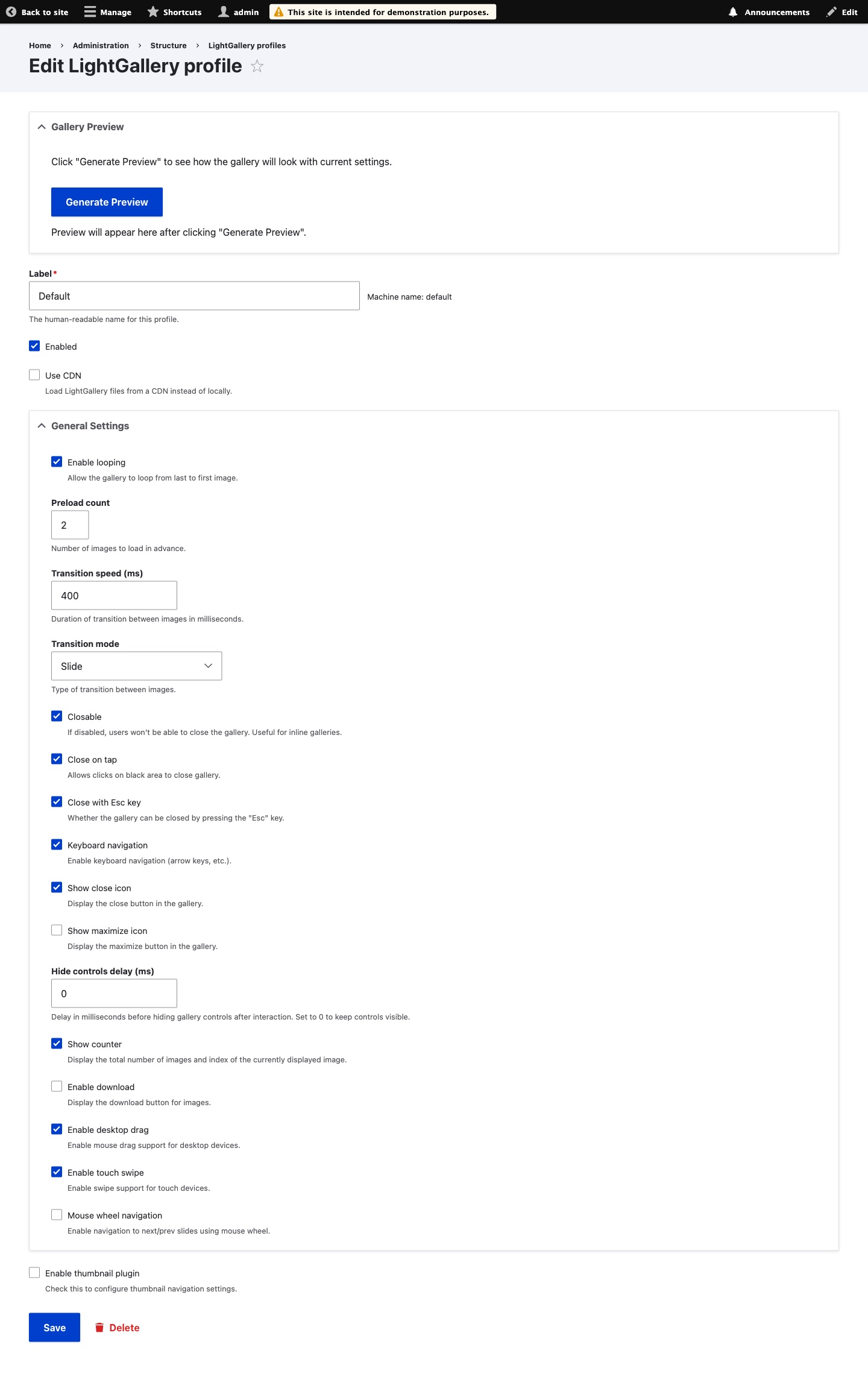

Tutorial
Features
- Profile-based Configuration — create reusable gallery profiles with different settings
- Local Library
- Remote Video Support — automatic YouTube/Vimeo thumbnail extraction
- Touch & Swipe — full mobile support with gestures
- Modern JavaScript — ES6, no jQuery dependency
- Rich Controls — zoom, fullscreen, thumbnails, download, keyboard navigation
Why LightGallery Formatter?
Unlike drupal/lightgallery, which requires configuring each field separately, this module utilizes reusable profiles. Create as many profiles as you need and switch between them instantly—configure once, use everywhere.
Zero-Dependency: There is no need to mess around with third-party libraries or manual Composer paths. Everything is built directly into the module. To see the full potential of these features, we strongly encourage you to install the "Lightgallery Formatter Demo" sub-module included in the package.
Key Advantages
- Native Media Support — Fully supports mixed content in a single gallery: Images, YouTube videos, and Vimeo videos.
- Zero External Libraries — Works out-of-the-box using Drupal Core Media. No manual JS downloads, extra libraries, or complex Composer steps required.
- No JSON required — All settings via UI checkboxes and dropdowns. No need to learn LightGallery API.
- Profile-based settings — Change one profile, update all galleries instantly (thanks to @bbu23 and @nk_).
- 30+ transitions — Slide, Fade, Zoom, Lollipop, Rotate, and more — all selectable from a dropdown.
- Config export — Profiles sync between environments via standard Drupal configuration.
- Live preview — Generate a live preview directly within the profile settings.
Also Supports
- Keyboard controls (Esc key, arrow keys, mouse wheel navigation)
- Touch gestures (swipe, drag)
- UI customization (close icon, maximize, counter, download button)
- Auto-hide controls with configurable delay
- YouTube/Vimeo thumbnail extraction
- Live preview when editing profiles
Similar Projects
- Swiper formatter — mobile slider library
- Colorbox — classic lightbox, jQuery-based
- PhotoSwipe — gesture-focused gallery
- GLightbox — modern lightbox with video
- Lightgallery/li> - one of the famous and oldest module integrated Lightgallery to drupal ecosystem. Required some dance around composer.json. Not so straight forward in the installation process.
Submodules
- LightGallery Formatter Demo — demo content for testing
- LightGallery Formatter Preview — live preview when configuring profiles
Credits
lightGallery library by Sachin Neravath (MIT License)
Installing LightGallery Library
Install via Composer to download the module and required libraries:
composer require drupal/lightgallery_formatterEnable the module via Drush:
drush en lightgallery_formatterOptional Submodules:
lightgallery_formatter_preview: Adds a live preview tab to the profile configuration.lightgallery_formatter_demo: Creates a content type and demo nodes for testing.
Enable them if needed:
drush en lightgallery_formatter_preview lightgallery_formatter_demoFor Developers
The project uses ddev-drupal-contrib for local development.
Quick Start
git clone [email protected]:project/lightgallery_formatter.git
cd lightgallery_formatter
ddev start
ddev lgf:init
This installs Drupal with demo_umami profile, enables the module with demo content, and provides admin login.
Useful Commands
ddev lgf:init— full reset and fresh installddev phpcs— check coding standardsddev phpcbf— auto-fix coding violationsddev phpstan— run static analysisddev phpunit— run tests
Architecture
- In progress...
Ask your assistant about Lightgallery Formatter
Check compatibility with your Drupal and PHP version, maintenance and security coverage, from current release data. How it works
Depends on
Dependencies of the latest stable release
- media Drupal core
- media_library Drupal core
Required by
Tracked projects that depend on this one
No tracked projects depend on this one yet.
Activity
Release Timeline
Releases
| Version | Type | Core | PHP | Release date | |
|---|---|---|---|---|---|
| 1.1.0 | Stable | 10–11 | Oct 1, 2026 | ||
| 1.0.9 | Stable | 10–11 | Mar 20, 2026 | ||
| 1.0.8 | Stable | 10–11 | Mar 2, 2026 | ||
| 1.0.x-dev | Dev | 10–11 | Mar 1, 2026 | ||
| 1.0.6 | Stable | 10–11 | Jan 5, 2026 | ||
| 1.0.5 | Stable | 10–11 | Dec 28, 2025 | ||
| 1.0.4 | Stable | 10–11 | Dec 28, 2025 | ||
| 1.0.3 | Stable | 10–11 | Dec 25, 2025 | ||
| 1.0.2 | Stable | 10–11 | Dec 22, 2025 | ||
| 1.0.1 | Stable | 10–11 | Dec 22, 2025 |