This module provides a service for integrating with Google Places, allowing developers to search for addresses and retrieve place metadata. It also offers AI Automator types that can generate address fields or full place metadata from unstructured text, search queries, or existing address fields.
Google Places is a module that currently have two things available for it. The one thing is a service where you can search and get addresses or metadata from the Google Places service for any third party module that would want to use it.
The other core feature is that it has two AI Automator types for the AI Automator module that can be found in the AI module. These makes it possible to take a search fields, address fields or even unstructured text to generate either address fields or all meta data available in Google Places API.
Please note that while it is possible to store the data from Google Places API temporarily for context chaining in AI Automator, storing them persistantly to show them to the website is against the Terms & Conditions of Google Places.
It also comes with a virtual field to fill out many Google Places metadata in one call.
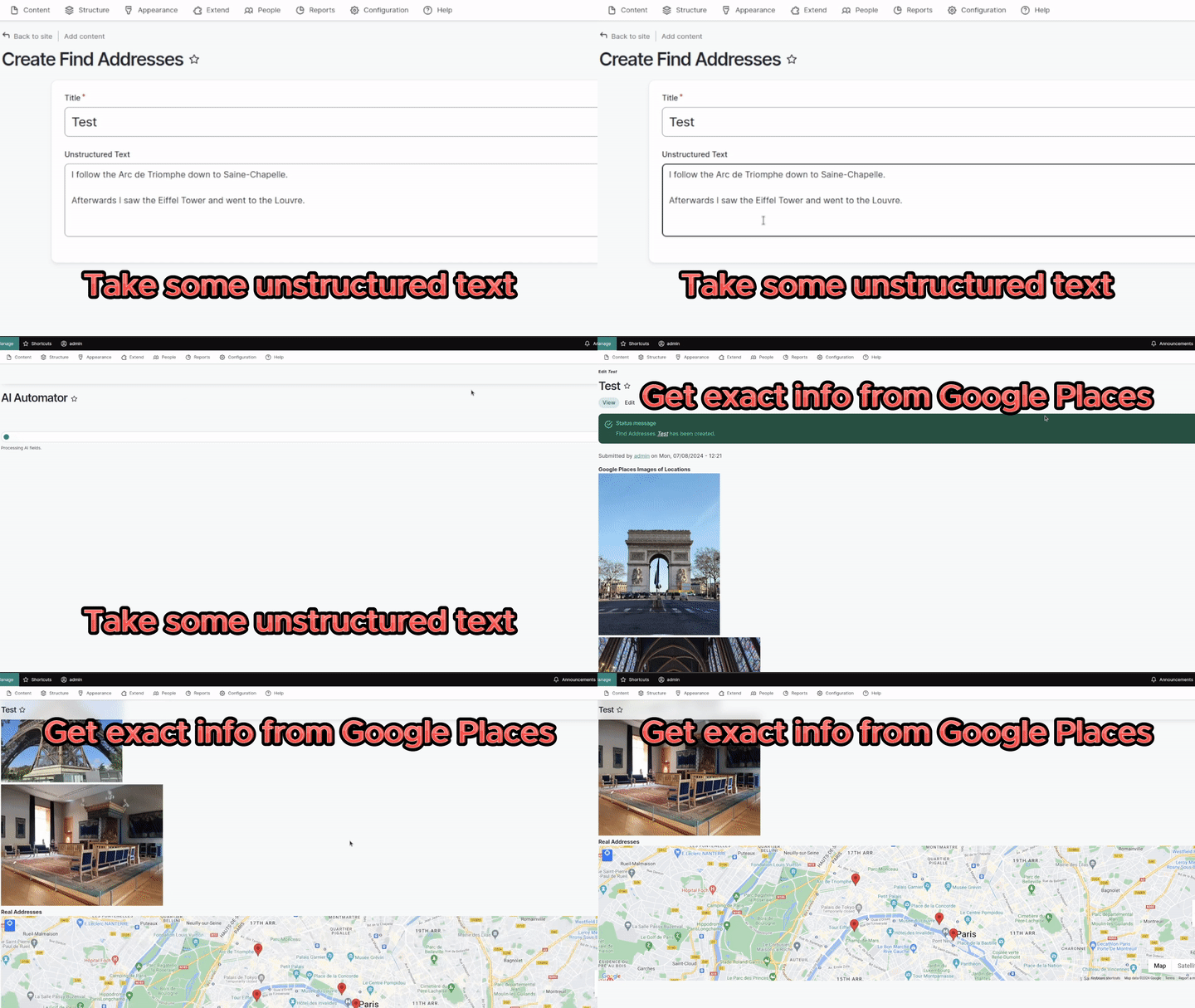
AI Automator taking unstructured text, generating addresss fields and then meta data from Google Places
For more information on how to use the AI Automator (previously AI Interpolator), check https://workflows-of-ai.com.
Features
- It can do search requests, detailed places requests and photo requests using a service.
- It can take and address fields and fill out image, title, review, description etc. fields using the AI Automator.
- It can take a text field and use that as search and fill out an address field using the the AI Automator.
- It can take a prompt using unstructured text and search for possible addresses based on the prompt and find only truthful addresses and fill the address field.
Requirements
- Requires an account at Google Places.
- Requires the AI module and a chat provider to be installed to do the unstructured text to address.
- To use it, you need to use a third party module using the service. Currently its only usable with the AI Automator submodule of the AI module
How to use as AI Automator type
- Install the AI module.
- Install this module.
- Visit /admin/config/google_places/settings and add your api keys from your Google Places account.
- Create some entity or node type with a simple text field.
- Create an address field.
- Enable AI Automator checkbox and configure it.
- Create an entity of the type you generated, fill in some search words and save.
- The address field be filled out.
How to use the Google Places service.
This is a code example on how you can search Google Places for ids.
$google_places = \Drupal::service('google_places.api');
// Field mask to use.
$field_mask = 'places.id';
// Search.
$result = $google_places->placesSearchApi('Bars near Brandenburger Tor', $field_mask);
This is a code example on how you can get details for that id.
$google_places = \Drupal::service('google_places.api');
// Field mask to use.
$field_mask = '*';
// Details.
$result = $google_places->placesDetailsApi($id, $field_mask);
This is a code example on how you can get images from that detail page.
$google_places = \Drupal::service('google_places.api');
// Params to use.
$params = ['maxWidthPx' => 2540];
// Image.
$binary = $google_places->getPhoto($namespace, $params);
Sponsors
This module was supported by FreelyGive (https://freelygive.io/), your partner in Drupal AI.
Ask your assistant about Google Places for AI
Check compatibility with your Drupal and PHP version, maintenance and security coverage, from current release data. How it works
Depends on
Dependencies of the latest stable release
No dependencies recorded for this project.
Required by
Tracked projects that depend on this one
No tracked projects depend on this one yet.
Activity
Release Timeline
Releases
| Version | Type | Core | PHP | Release date | |
|---|---|---|---|---|---|
| 1.0.0-beta3 | Pre-release | 10–11 | Jan 15, 2026 | ||
| 1.0.0-beta2 | Pre-release | 10–11 | Oct 13, 2024 | ||
| 1.0.0-beta1 | Pre-release | 10–11 | Sep 19, 2024 | ||
| 1.0.x-dev | Dev | 10–11 | Jul 8, 2024 |