This module adds a formatter to Drupal's File field that allows you to display PDFs, Word documents, PowerPoint presentations, or Excel spreadsheets directly within a node. It uses the Google Docs viewer to render the content, but requires that the files are publicly accessible on the web.
Overview
The Embedded Google Docs Viewer module adds a new formatter to the File field using the Field API. This formatter displays PDFs, Microsft Word documents, Powerpoint presentations, or Excel spreadsheets directly within a Drupal node.
Requirements
The Embedded Google Docs Viewer is a custom formatter for the Core "Field" module - therefore the "Field" module must be enabled.
Any files to be formatted/rendered by this module must be accessible on the open web - Google needs to be able to access them in order for Google Docs to be able to format them - so your Drupal system must not be behind a firewall, must be reachable by normal web users, and your system must store the files as "public:".
Tutorials
To use this module and add embedded documents to your Drupal nodes, add a "File" field to one of your site's Content Types. Under the "Manage Fields" tab, add appropriate "Allowed file extensions," i.e. one or more of pdf, doc, docx, xls, xlsx, ppt, or pptx. Then under the "Manage Display" tab, select "Embedded Google Docs Viewer" as the field formatter. From then on you will be able to upload/add and display pdfs, etc. to the content type to which you added the new field.
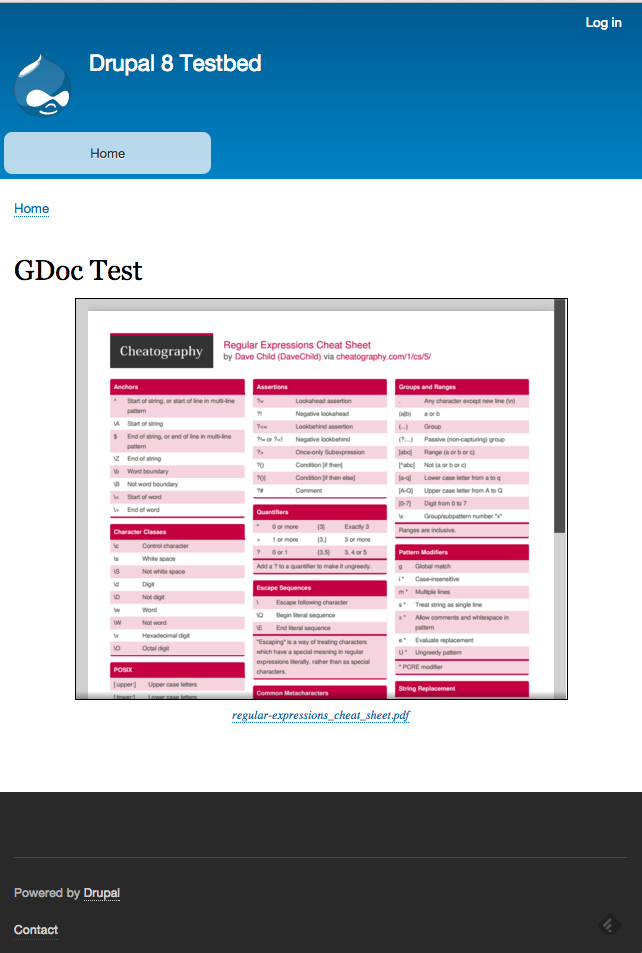
When displaying a page containing an Embedded Google Docs field, the formatter builds an iframe within the current node using the url of the file to construct a larger url for Google's embeddable Google Docs viewer. That combined Google url is the source for the iframe's content. The iframe is stylable (as much as any iframe is) using the CSS selector ".gdoc-field". The default values for .gdoc-field are included in the project's file "gdoc_field.css."
Drupal 8
This module provides a formatter for the File field type. This formatter presents the file as a fully rendered object within a web page - i.e. it displays the contents of the file as appropriate to its filetype (Adobe Acrobat .pdf, Microsoft Word .doc/.docx, Microsoft Excel .xls/.xlsx, Microsoft Powerpoint .ppt/.pptx), using the Google Docs embedded rendering engine.
N.B.: Only files that are publicly accessible may use this formatter - Google Docs must be able to access the file in order to render and display it. In other words, it won't work on a typical development laptop, or if your server is behind a firewall where Google is unable to access it.
To use this field format, add a File field to a new or existing content type (such as Basic Page) on the content type's Manage Fields form. The File field type provides only one widget type - File - so select that. On the content type's 'Manage Display' form, there will be a drop-down select list of available display formats for the File field. To display the file within the embedded Google Docs viewer, choose the 'Embedded Google Documents Viewer' format.
The document viewer is styled by default using the gdoc-field.html.twig template. Several theme suggestions are provided to allow customization of the display for this field. By default, the viewer's width is 80% with 10% margins on left and right, and its height is 400px, with a 1px solid black border.
Ask your assistant about Embedded Google Docs Viewer
Check compatibility with your Drupal and PHP version, maintenance and security coverage, from current release data. How it works
Depends on
Dependencies of the latest stable release
- field Drupal core
Required by
Tracked projects that depend on this one
No tracked projects depend on this one yet.
Activity
Releases
| Version | Type | Core | PHP | Release date | |
|---|---|---|---|---|---|
| 8.x-1.4 | Stable | 9–10 | Mar 16, 2023 |