This module provides a drag-and-drop interface for organizing, storing, and sharing files within a Drupal site. It allows users to manage files and folders like a desktop file explorer, control access permissions, and optionally make content public.
FolderShare: A pure Drupal module for file sharing; data organization and data storage (Digital asset management system | Data management system)
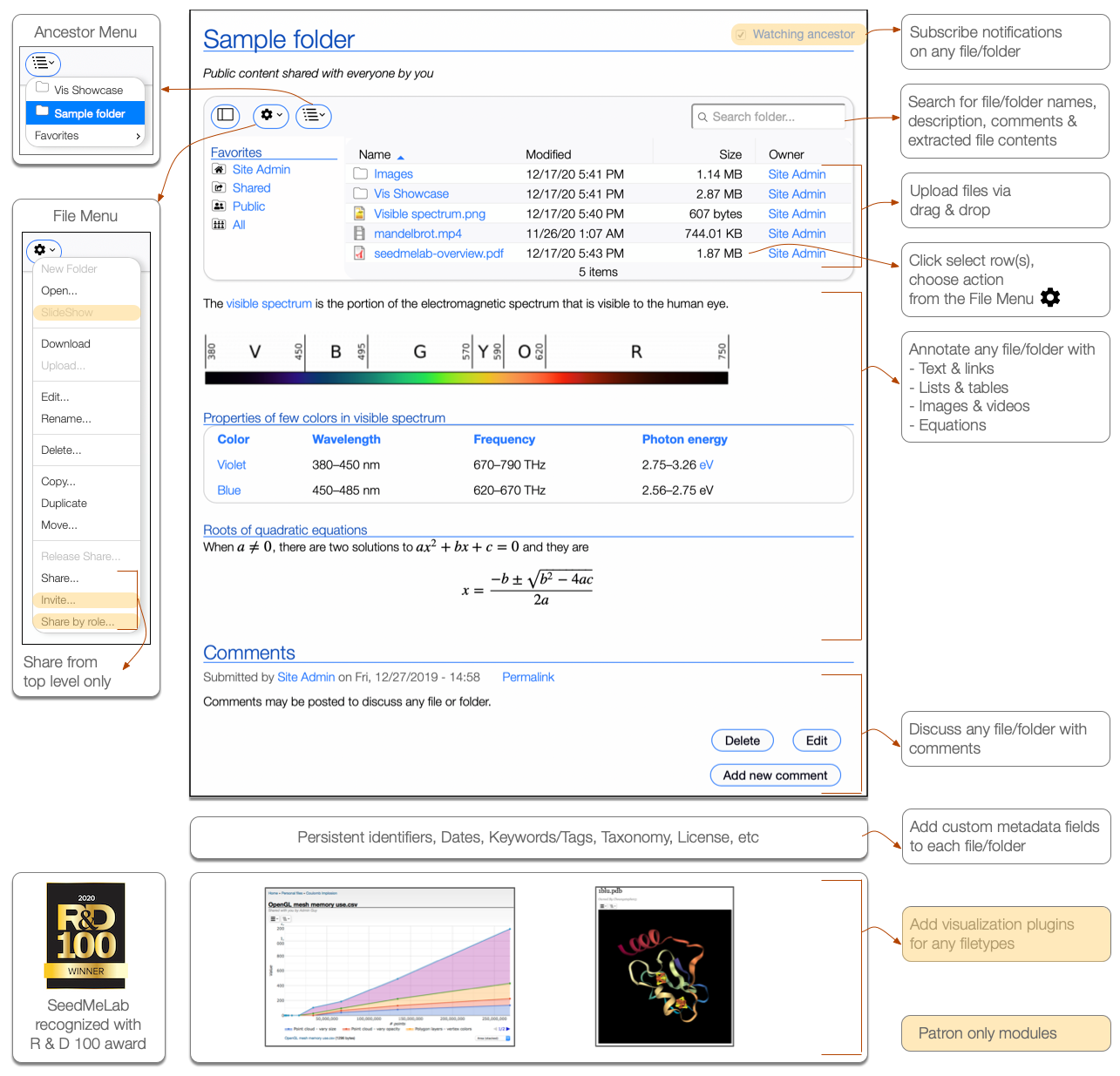
FolderShare enables drag-and-drop file uploads, file-sharing and rich data organization capabilities on a Drupal site. It provides a powerful graphical file browser to manage files/folders like Windows Explorer or Mac's Finder. Files are stored on the web server and tracked in the website database. Access controls to file/folders is set by users if they are granted appropriate module permissions for their roles.
FolderShare is at the helm of SeedMeLab project, which was recognized with a 2020 R&D 100 award.
See short overview videos below
- Usage (Recommended)
- Configuration overview
- Managing data via REST client (Requires FolderShare REST module)
- Companion module configuration (Requires ChartSuite and FormatterSuite modules)
Uses
Store and manage data/digital assets on a Drupal website
Users of FolderShare may create, edit and organize a folder tree with files and folders that are managed by the website. Users may upload files into folders, move, copy, duplicate, add description, rename, search, delete, and download files and folders.
File sharing from a Drupal website
By default, users have exclusive access to their files and folders (i.e. everything is private), but they may elect to share folder trees with specific users and allow them to View and Edit (Author) their folder content. Additionally, users may elect to make their folders/files public.
User interface and feature highlights
Requirements
- Drupal 10.x
- PHP 8.2.x
- Carefully review module's help page at /admin/help/foldershare
Known issues
FolderShare does not work with
- Websites configured on a subfolder do not work well. Website must be configured to run on a top level domain or subdomain. See issue 3012639.
- Websites using PostGRES database will not work with FolderShare. Currently FolderShare works with MySQL and SQLite databases
Site customization
Administrators have a rich set of controls to customize this module for their site
1. Module Permissions at /admin/people/permissions#foldershare
Set role based permissions to grant major module capabilities
2. Minimal Module Configuration at /admin/structure/foldershare
- Set Drupal's public or private (recommended) filesystem to store the uploaded files
- Restrict file uploads by extension if desired
- Set rebuild interval for usage report
3. Usage Report at /admin/reports/foldershare
FolderShare usage report displays usage summary for all site users
4. Cron
To avoid PHP execution time limits FolderShare will queue long running tasks that are subsequently executed at cron run, so it is recommend to run cron frequently from external source and not use Drupal core's automated cron.
5. REST interface
If desired, install FolderShare REST module.
Design notes
- Folders exists only in the database, not on the file system
- Files are stored with machine generated names and machine generated hierarchy for security and performance reasons
- Folders and files can be only shared from the top most level, hence everything inside a top level folder inherits same access privileges
- Unlike Node, additional bundles/content types cannot be created for FolderShare entity
Demonstration
Explore a pre configured demonstration from your web browser. The demonstration site has additional features like share invites, share by role, image slideshow, notification and subscription and video/other formatters which are only available for patrons purchasing maintenance, see notes on supporting the module below.
Companion modules and tools
- FolderShare REST: Install this module, then use command line utility shipped with the module in "client" folder. See a video which shows sample command line interaction.
- Chart Suite: Install, then configure it to generate automatic visualization for simple CSV/JSON files in a folder listing. See Companion module configuration video which displays a chart when CSV, HTM or JSON files are opened.
- Formatter Suite: Install, then configure it to improve display of images in a folder listing. See Companion module configuration video which displays filename, file size and resolution above the image. Formatter Suite supports presentations of several other field types.

Video recordings of prior talks
These videos are now dated and listed just for posterity, see videos noted above for module capabilities.
Support this module
By sharing your success story or a note with us
Acknowledgements
Developed by the San Diego Supercomputer Center (SDSC) at the University of California at San Diego (UCSD) and originally funded by the National Science Foundation (NSF) under Grant No. 1443083.Ask your assistant about FolderShare
Check compatibility with your Drupal and PHP version, maintenance and security coverage, from current release data. How it works
Depends on
Dependencies of the latest stable release
- datetime Drupal core
- field Drupal core
- file Drupal core
- filter Drupal core
- image Drupal core
- jquery_ui_button Drupal core
- jquery_ui_menu Drupal core
- link Drupal core
- media Drupal core
- options Drupal core
- system Drupal core >=8.7
- text Drupal core
- user Drupal core
- views Drupal core
Required by
1 tracked project depends on this one
- FolderShare REST 6 sites
Activity
Release Timeline
Releases
| Version | Type | Core | PHP | Release date | |
|---|---|---|---|---|---|
| 3.1.0-beta2 | Pre-release | 10–11 | Aug 7, 2026 | ||
| 3.1.0-beta1 | Pre-release | 10–11 | Jul 14, 2026 | ||
| 3.1.0-alpha5 | Pre-release | 10 | Apr 2, 2025 | ||
| 3.1.0-alpha4 | Pre-release | 10 | Apr 2, 2025 | ||
| 3.1.0-alpha3 | Pre-release | 10 | Jan 7, 2025 | ||
| 8.x-1.8 | Stable | 10 | Jul 11, 2024 | ||
| 8.x-1.7 | Stable | 10 | PHP 7.2 | Aug 31, 2023 |