The Field States module allows you to create state machines for your Drupal fields, defining transitions and controlling access through roles and permissions. It offers a visual editor for creating states and transitions, and supports custom logic for workflow and actions.
Field States module is base on state machine module. Unlike the standard state machine module, Field States offers an extended feature set. With this module, you have the flexibility to define a list of states, and within your field settings, you can easily specify transitions. This process becomes even more user-friendly, as you can conveniently copy and paste configurations directly from your workflow YAML files.
Field States uses library mermaid.js for visualizing your state machine, making it easy to understand and manage your states and transitions. Moreover, in the field formatter, you have the added convenience of selecting transitions effortlessly, enhancing your overall workflow management experience.
There are state machine editor. you can draw and config transitions (support only bootstrap 5 theme), It will create a state machine directly and not via yml configuration.
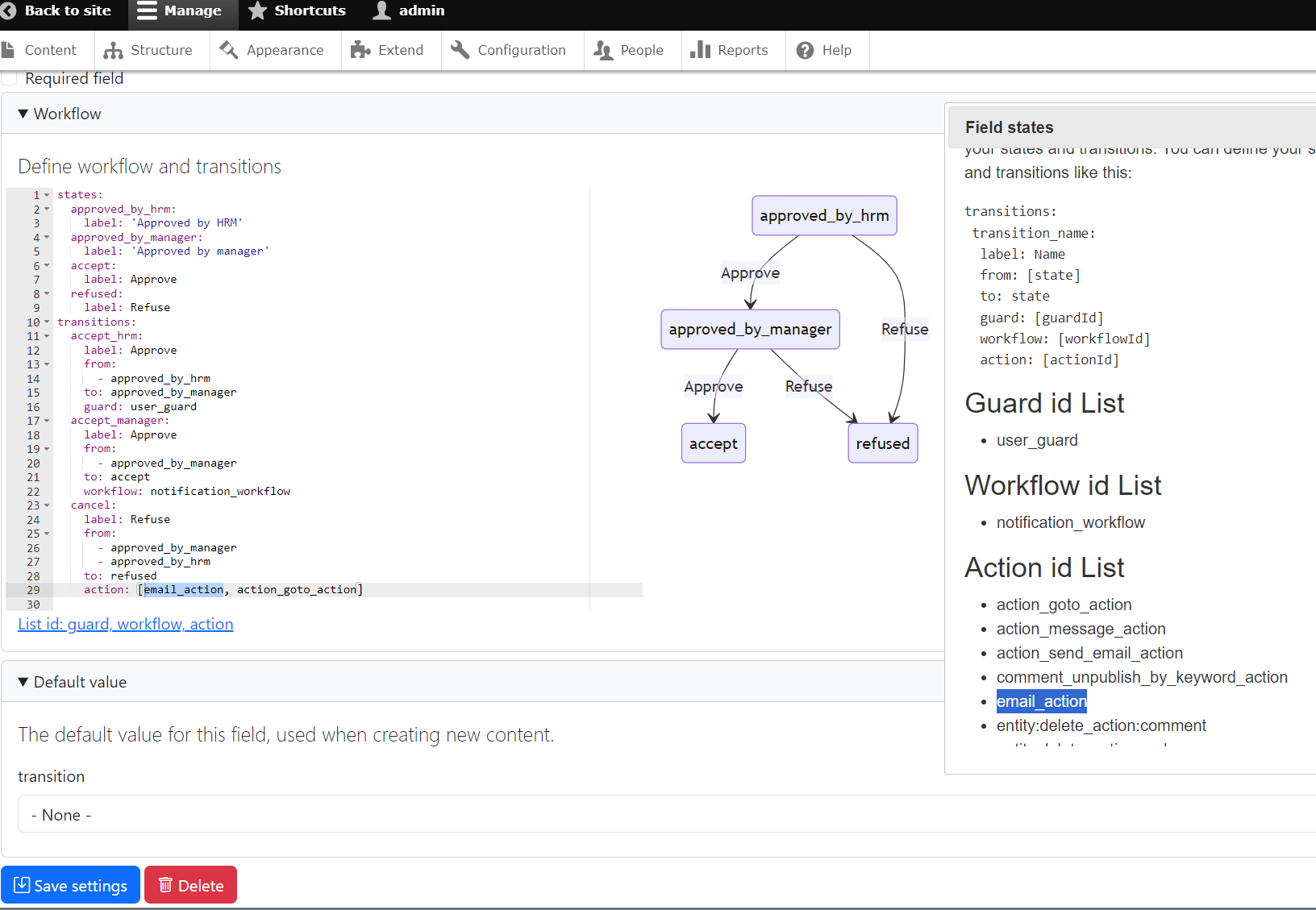
How to work
- Add field States transitions
- Fill all state in field storage (it looks like list string)
- set transitions in field settings (Yaml format)
- label: Transition Button Name
- from: [Multi states] # The states from which this transition is allowed
- to: state # The state to which the field should transition
- role: The role name that can see the transition button
- permission: Permission can see button
- group: Group id
- guard: Guard Plugin ID in Your Custom Module (method allowed) #
- workflow: [Multi workflow id] in your custom module (Pre-transitions method action)# Custom workflow logic if needed
- action: [Multi action id] in your custom module (Post-transitions method execute)# Custom action logic if needed
- extra: True|False
In case of you don't want to show extra field
guard: create custom/your_module/src/Plugin/Guard/CustomGuardPlugin.php
workflow: create custom/your_module/src/Plugin/Workflow/CustomWorkflowPlugin.php
action: create custom/your_module/src/Plugin/Action/CustomWorkflowPlugin.php
you can see exemple in module.
Extra field: In case you want to submit with a certain field, you can choose this field option. For example, when you want users to leave comments when changing status
History field: support double field, triple field, json table field
The Field State module for Drupal manages state machine transitions with a seamless process. To display the button, the module first verifies the [role], if it defines in field setting, ensuring it matches the [permission] if it defines in field setting. After that it will run [guard] to check. When the state transition button is pressed, the module triggers the execution of the [workflow]->action(), you can cutomize your logic before entity save. 'Cos this methode uses reference variable &$transitions. The module then saves the updated state to entity. It proceeds [action]->execute().This comprehensive sequence ensures smooth and flexible handling of state transitions in the Drupal environment.
Do you like this module? Show your appreciation by buying me ☕.
Ask your assistant about Field States transitions
Check compatibility with your Drupal and PHP version, maintenance and security coverage, from current release data. How it works
Depends on
Dependencies of the latest stable release
- options Drupal core
- views Drupal core
Required by
Tracked projects that depend on this one
No tracked projects depend on this one yet.
Activity
Release Timeline
Releases
| Version | Type | Core | PHP | Release date | |
|---|---|---|---|---|---|
| 2.0.4 | Stable | 11 | Mar 8, 2026 | ||
| 2.0.3 | Stable | 11 | Jul 7, 2025 | ||
| 2.0.2 | Stable | 11 | Jan 22, 2025 | ||
| 2.0.1 | Stable | 11 | Jan 8, 2025 | ||
| 2.0.0 | Stable | 8–11 | Jan 8, 2025 | ||
| 2.x-dev | Dev | 11 | Jan 8, 2025 | ||
| 1.0.13 | Stable | 8–10 | Jan 8, 2025 | ||
| 1.0.12 | Stable | 8–11 | Nov 28, 2024 | ||
| 1.0.11 | Stable | 8–11 | May 7, 2024 | ||
| 1.0.10 | Stable | 8–11 | Mar 8, 2024 |