Draggable Dashboard allows privileged users to create and customize dashboards composed of various blocks. Users can rearrange these blocks, maximize or minimize them, with their layout and preferences saved automatically in their browser. These dashboards can then be placed as blocks on any page of the website.
The purpose of the Draggable dashboard module is to create dashboards, that consist of different blocks.
Screenshots:

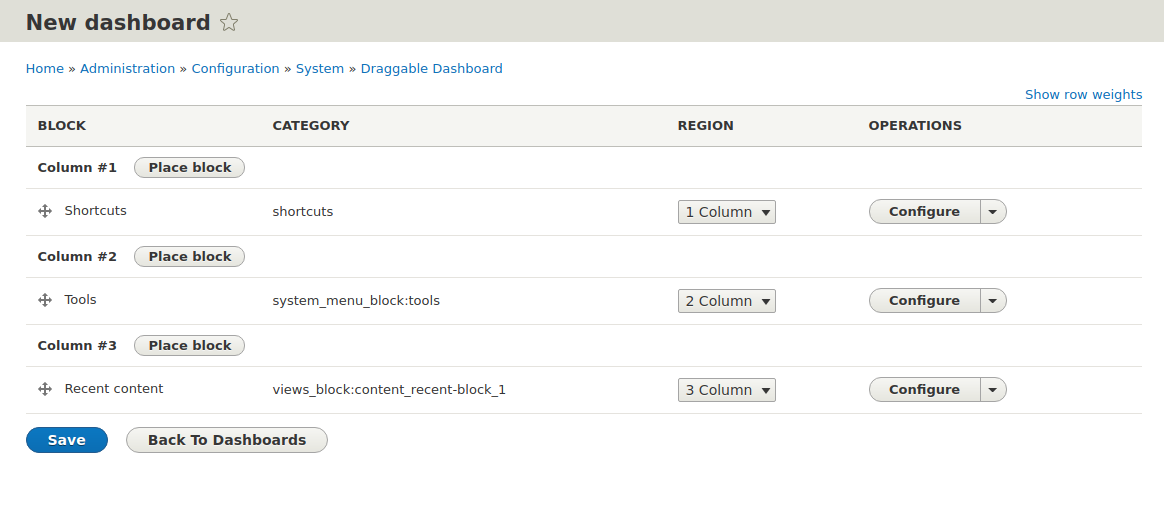
Main features/ functionalities:
- Draggable dashboard allows privileged users create dashboards that can be placed as blocks anywhere on the website.
- For each dashboard a layout and blocks for display can be configured.
- Users can drag the blocks around on the dashboard and maximize or minimize blocks.
- The changed layout and the minimized options are saved to Local Storage of the browser - so when the user loads the page again it will display the saved settings.
Installation:
- Install module
- Create a dashboard under '/admin/config/system/draggable_dashboard' (1.x version) or '/admin/structure/draggable-dashboard' (2.x version) and add the blocks you want to display on the dashboard. This will create a block for the dashboard.
- Go to Block Layout and add your dashboard block to the page.
Configuration:
In the backend '/admin/config/system/draggable_dashboard' (1.x version) or '/admin/structure/draggable-dashboard' (2.x version) logged in users can:
- Create dashboards
- Choose layout: from 1 to 4 columns
- Add, re-arrange and remove blocks
- The available blocks can be configured
Supporting organization
1xINTERNET is a full-service digital agency with a focus on creating robust and innovative digital solutions based on Drupal. Having a wide expertise in Drupal development, we support our clients in all steps of the way towards a successful digital transformation. 1xINTERNET is a Gold Certified Drupal Partner and active contributor to the Drupal Community.
Ask your assistant about Draggable dashboard
Check compatibility with your Drupal and PHP version, maintenance and security coverage, from current release data. How it works
Depends on
Dependencies of the latest stable release
No dependencies recorded for this project.
Required by
Tracked projects that depend on this one
No tracked projects depend on this one yet.
Activity
Release Timeline
Releases
| Version | Type | Core | PHP | Release date | |
|---|---|---|---|---|---|
| 8.x-2.0-alpha8 | Pre-release | 9–11 | Oct 10, 2025 | ||
| 8.x-1.7 | Stable | 8–9 | Nov 20, 2024 | ||
| 8.x-2.0-alpha7 | Pre-release | 9–11 | Nov 12, 2024 | ||
| 8.x-2.0-alpha6 | Pre-release | 9–11 | Aug 14, 2024 |