
Auto Unblock Users
If you are using the Login Security module in your Drupal site then Auto Unblock Users helps you to activate users automatically as the track time expires. It'll work like an extension with Login Security module.
By default, Login Security module doesn't has "unblock users" option. While by using the Auto Unblock Users module, an administrator may select the option (as in screenshort) to automate it instead of activate users manually.
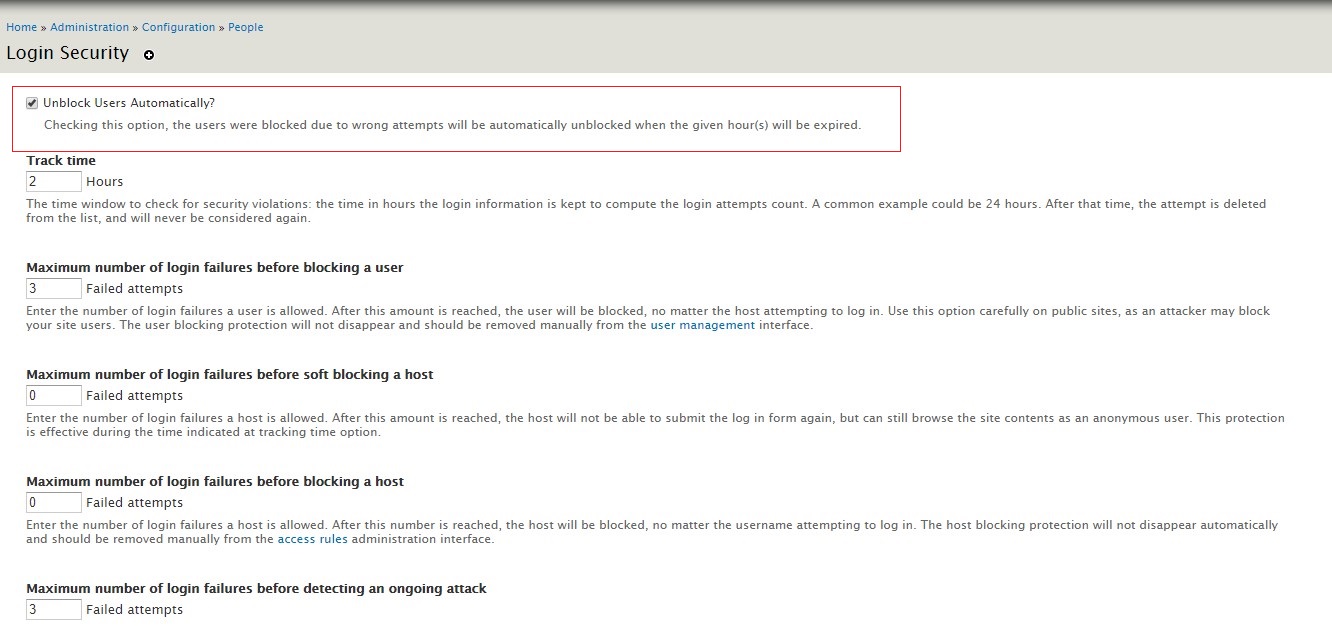
This module will not unblock or activate users those have been blocked by administrator manually.
A blocked/active account could also be active/unblocked through the administration section:
/admin/user/user
Installation
To install, copy the Auto Unblock Users module to folder in your modules directory (/sites/all/modules or /sites/all/modules/contrib)
Go to /admin/modules and under the "Other" frame the "Auto Unblock Users" module item will appear in the list. Enable the Checkbox and save the configuration.
Configuration options
You should have the 'administer site configuration' permission to configure the Login Security module.
Go to the url path /admin/config/people/login_security and a form with the module options will be shown including "Unblock Users Automatically?" checkbox on the very top.
Its done
Depends on
Dependencies of the latest stable release
No dependencies recorded for this project.
Required by
Tracked projects that depend on this one
No tracked projects depend on this one yet.